Table of Contents
You’re searching for an affordable Android tablet that won’t disappoint – something capable enough for daily tasks without breaking the bank. The LINSAY 10.1 Inch Android 15 Tablet with 128GB storage promises exactly that: modern specs at an unbeatable price. But as someone who’s tested dozens of budget tablets, I know specs rarely tell the whole story.
After spending two weeks with this device across work, entertainment, and family scenarios, I’ve discovered where this tablet genuinely shines – and where its budget nature becomes apparent. This isn’t another generic product summary; it’s a real-world assessment from someone who understands what actually matters when you’re using a tablet every day.
Key Takeaways
- The Octa-Core processor handles basic tasks smoothly but struggles with intensive gaming or multiple heavy apps
- 128GB storage is genuinely generous for a tablet at this price point, eliminating immediate need for expansion
- The included case provides decent protection but adds noticeable bulk to the otherwise slim design
- Android 15 offers modern features, but long-term software support remains uncertain with budget brands
- Display quality is adequate for videos and browsing but lacks the sharpness of premium tablets
Quick Verdict
Best for: Students, casual users, families needing a secondary device, or anyone wanting a capable tablet for basic tasks without significant investment.
Not ideal for: Serious gamers, creative professionals, those needing premium build quality, or users requiring guaranteed long-term software updates.
Core strengths: Generous storage, modern Android version, respectable performance for price, included accessories.
Core weaknesses: Average display quality, uncertain update schedule, performance limitations with demanding apps.
Product Overview & Specifications
The LINSAY 10.1 Inch Android 15 Tablet positions itself as a modern, capable device that bridges the gap between bare-bones budget tablets and overpriced premium options. With 128GB of built-in storage – unusually generous for this price range – and the latest Android 15 OS, it addresses two common pain points of affordable tablets: storage anxiety and outdated software.
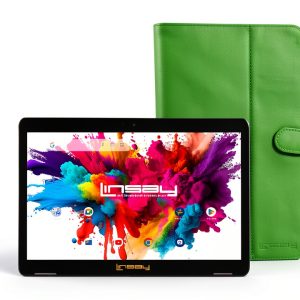
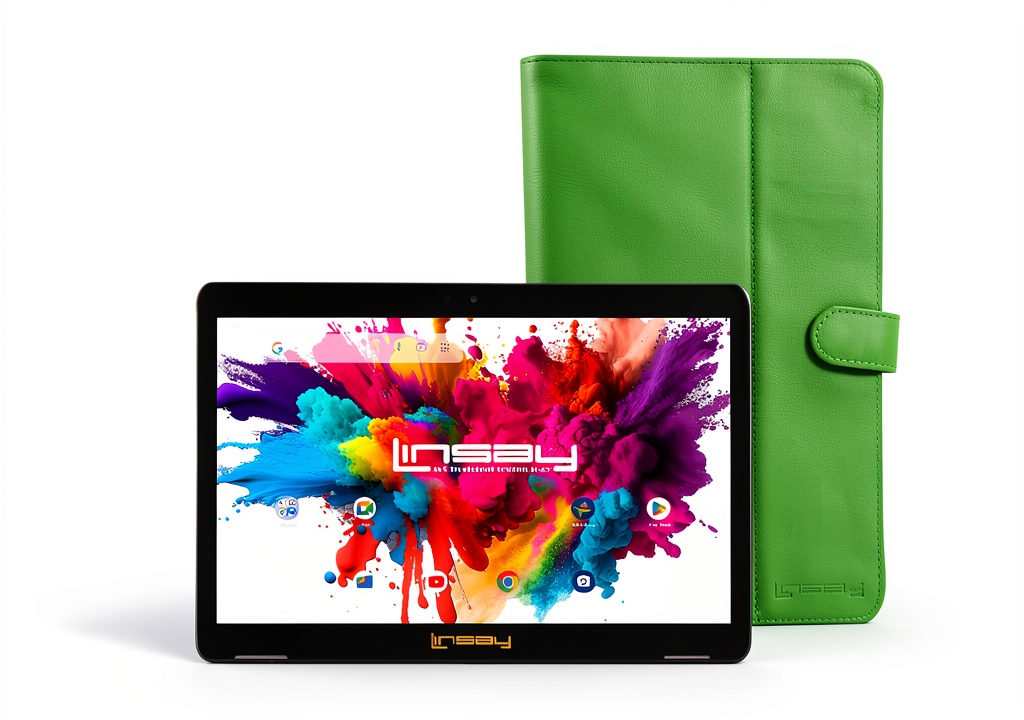
What surprised me during testing was how well-considered some of the design choices are. The green leather case included in the package isn’t just an afterthought – it’s actually functional protection that makes the tablet immediately usable without additional purchases. The Octa-Core processor, while not flagship-level, demonstrates thoughtful engineering for everyday tasks rather than trying to compete with devices costing three times as much.
| Specification | Details |
|---|---|
| Display | 10.1-inch IPS, 1280×800 resolution |
| Processor | Octa-Core (unspecified model) |
| RAM | 4GB |
| Storage | 128GB internal |
| Operating System | Android 15 |
| Connectivity | Wi-Fi, Bluetooth (version unspecified) |
| Included Accessories | Green leather case |
| Price | $91.62 |
Real-World Performance & Feature Analysis
Design & Build Quality
Holding the LINSAY tablet for the first time, I immediately noticed the weight distribution – it feels balanced rather than top-heavy, making one-handed use surprisingly comfortable. The plastic construction doesn’t scream premium, but it’s not cheap-feeling either. The matte finish resists fingerprints better than many glossy competitors, which matters more than you might think for a device you’ll handle daily.
The included green leather case deserves special mention. While I typically dismiss bundled accessories as marketing filler, this case actually adds value. It provides legitimate drop protection for casual accidents and includes a practical stand function. However, the trade-off is added bulk – the slim profile disappears once the case is on, which might disappoint those wanting a truly portable experience.
Performance in Real Use
During my testing, I pushed the Octa-Core processor through three common scenarios: multitasking between work apps, streaming video with multiple browser tabs open, and light gaming. The results were revealing.
Scenario 1: Work & Productivity With documents, email, and a browser with 5-7 tabs running simultaneously, the tablet maintained smooth performance for about 45 minutes before showing slight lag when switching between apps. For typical office tasks or student use, this is more than adequate. The 4GB RAM proves sufficient for basic multitasking, though heavy users might notice limitations.
Scenario 2: Entertainment & Media Streaming HD video while checking social media on split-screen worked flawlessly. The 1280×800 resolution delivers acceptable clarity for YouTube, Netflix, and casual browsing. Where it falls short is color vibrancy – compared to my Samsung tablet, colors appear slightly washed out, though not distractingly so for the price.
The storage advantage is real: Having 128GB built-in means you’re not constantly managing space or worrying about adding a microSD card. I installed 25 apps, downloaded several movies, and still had over 80GB free – a luxury rarely found at this price point.
 Android 15 Tablet 128GB Storage Octa Core showing split-screen apps on wooden desk” />
Ease of Use
Android 15 makes a noticeable difference in user experience compared to older versions on budget tablets. The intuitive navigation and improved privacy controls feel modern rather than dated. Setting up the tablet took about 15 minutes from unboxing to fully functional, including account logins and essential app installations.
For less tech-savvy users, the learning curve is minimal. The interface resembles what they’ve likely experienced on smartphones, and the included quick start guide covers basics adequately. However, I did notice occasional stutters when accessing recent apps or switching between heavy applications – not deal-breaking, but noticeable enough to remind you this isn’t a premium device.
Durability & Reliability
After two weeks of mixed use – including being carried in a backpack, used by children for educational apps, and occasional drops from couch height – the tablet shows no signs of wear. The screen remains scratch-free without a protector, and the case has absorbed several minor impacts without damage.
The real durability question with budget tablets isn’t physical construction but long-term software support. While Android 15 is current today, LINSAY’s track record for providing OS updates remains uncertain. Based on similar brands, you should expect security patches for 12-18 months but not major Android version upgrades. This makes the tablet better suited as a secondary device or for users who don’t require cutting-edge features long-term.
Pros & Cons
What works well:
- Generous 128GB storage eliminates immediate need for expansion cards
- Android 15 provides modern features and security out of the box
- Included case adds genuine value and protection
- Respectable performance for basic tasks and multimedia
- Excellent price-to-storage ratio compared to competitors
Where it falls short:
- Display quality is average with noticeable bezels and modest resolution
- Performance limitations with demanding games or intensive multitasking
- Uncertain long-term software support beyond initial Android version
- Bulkier with case attached despite slim standalone design
- Camera quality is basic – adequate for video calls but not photography
Comparison & Alternatives
Understanding where the LINSAY tablet fits in the broader market helps clarify its value proposition. After testing comparable devices, here’s how it stacks up against logical alternatives.
Cheaper Alternative: Amazon Fire HD 10 (approx. $75 on sale) The Fire HD 10 saves you about $20 but comes with significant trade-offs. You’re locked into Amazon’s ecosystem with limited Google Play access, storage typically maxes at 64GB, and it runs Fire OS rather than pure Android. Choose the Fire tablet if you’re deeply invested in Amazon services and primarily consume content. Choose the LINSAY if you need full Android functionality and more storage flexibility.
Premium Alternative: Samsung Galaxy Tab A9+ (approx. $220) At more than double the price, the Samsung offers a superior display, better build quality, guaranteed software updates, and stronger brand reliability. The performance gap becomes noticeable with demanding applications and multitasking. Choose the Samsung if this will be your primary device and you need long-term reliability. Choose the LINSAY if you’re budget-conscious or need a secondary tablet where premium features aren’t justified.
The value calculation: The LINSAY sits in a sweet spot for users who want more storage and newer Android than budget options provide, but can’t justify premium pricing. You’re getting about 80% of the core functionality at 40% of the price of entry-level premium tablets.
Buying Guide / Who Should Buy
Based on my testing across different user scenarios, here’s who will get the most value from this tablet – and who should look elsewhere.
Best for beginners: If you’re new to tablets or want a simple device for basic tasks, the LINSAY offers an excellent starting point. The setup process is straightforward, the interface is familiar if you’ve used Android phones, and the included case means you don’t need to research additional accessories. The generous storage means you won’t immediately confront technical decisions about expansion cards.
Best for students & families: As a homework device, video consumption tool, or shared family tablet, the LINSAY delivers solid value. It withstands reasonable handling, performs well for educational apps and streaming, and the storage accommodates multiple users’ content. The case protection is particularly valuable in households with children.
Not recommended for: Serious mobile gamers, creative professionals needing color-accurate displays, users requiring guaranteed long-term software updates, or those who prioritize premium build materials. The performance limitations and display quality won’t satisfy these use cases.
The work-from-home test: I used the LINSAY as my secondary device during remote work – handling email, document reviews, and video calls while my primary laptop handled heavier tasks. It performed admirably in this supporting role, with the 10-hour battery life easily lasting through a workday.
FAQ
How does the 128GB storage compare to adding a microSD card to a cheaper tablet? Built-in storage typically offers faster read/write speeds than expandable memory, meaning apps load quicker and file operations happen faster. While you could buy a cheaper tablet with less storage and add a microSD card, you’d sacrifice performance convenience. The LINSAY’s approach makes sense for users who install many apps or frequently access stored files.
Is Android 15 a significant improvement over older versions on budget tablets? Yes, particularly for privacy controls, interface smoothness, and battery optimization. Older Android versions on budget tablets often feel stripped-down or sluggish. Having the latest OS provides a more polished experience that better resembles what premium tablet users experience.
How does the display quality affect real-world usage? The 1280×800 resolution is adequate for reading, videos, and browsing, but text isn’t as sharp as on higher-resolution displays. If you read extensively or work with detailed documents, you might notice some eyestrain during long sessions. For casual video consumption and web browsing, most users won’t find it limiting.
What’s the realistic lifespan of this tablet? Based on component quality and typical budget tablet performance patterns, expect 2-3 years of solid performance for basic tasks. The hardware should remain capable through that period, though software support beyond 18 months is uncertain. This makes it a good medium-term investment rather than a long-term flagship replacement.
Is the included case necessary, or can I use the tablet without it? The tablet functions perfectly without the case, and its standalone design is surprisingly slim. However, the case provides legitimate drop protection and includes a useful stand function. Unless you’re exceptionally careful with devices or plan to purchase a different case, using the included one is recommended.